
Sleek New Tab Experience for Chrome
Overview
The Clear New Tab theme is a lightweight desktop utility designed for Chrome users seeking a clean, distraction-free browsing experience. Developed by LoftyShaky, this tool replaces the default new tab page with a minimalist interface focused on simplicity and usability. It targets individuals who prioritize productivity, digital clarity, and visual calm in their daily workflows. The software is particularly suited for remote workers, students, and creatives who rely heavily on web-based tasks and prefer a streamlined browser environment.
By removing clutter and visual noise from the new tab page, the theme aims to reduce cognitive load and improve focus. Users can launch new tabs without distractions, making it easier to manage multiple tasks or initiate research. The theme is available across multiple platforms, including Windows, macOS, and Linux, ensuring broad accessibility. While the developer did not provide additional system requirements, the 1.5 MB file size suggests a low footprint and minimal impact on system performance.
Key Features & Capabilities
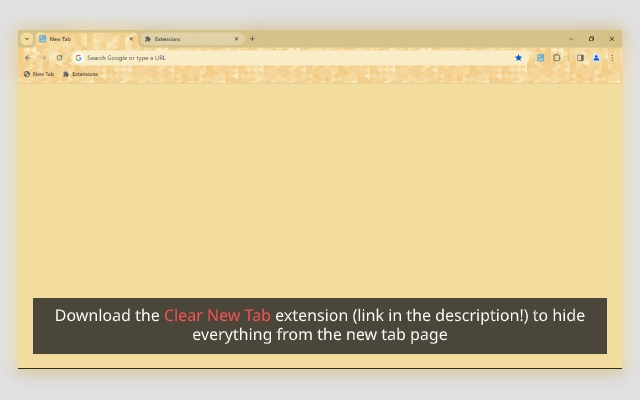
- Minimalist Design – Replaces the standard Chrome new tab with a clean, white background and subtle visual elements, ideal for users who value simplicity.
- Platform Compatibility – Supports Windows, macOS, and Linux, allowing consistent use across different operating systems.
- Easy Installation – Available via Chrome Web Store and direct package downloads, enabling quick setup for all users.
- Customization Options – Offers variants in different colors through the Triangle Series, allowing users to personalize the theme to match their preferences.
- Developer Support & Updates – Regular updates and community engagement via the developer’s Facebook group and donation platform.
Users can leverage this theme in real-world scenarios such as research sessions, content creation, or focused work sprints. The absence of intrusive visuals ensures that attention remains on the task at hand. The ability to switch between color variants helps maintain visual interest without compromising clarity. For users managing multiple browser profiles or devices, the cross-platform availability ensures a uniform experience.
User Interface, Workflow & Performance
The user interface is intentionally simple, featuring a blank white canvas with minimal navigation elements. This design reduces visual clutter and allows users to start new tabs instantly without unnecessary steps. Navigation remains consistent with standard Chrome behavior, requiring no learning curve. The workflow is streamlined: once installed, the theme activates automatically on new tab creation, delivering immediate results.
Performance details were not specified by the developer. However, the 1.5 MB file size indicates a lightweight application with low resource consumption. The developer did not provide information on CPU or RAM usage. General software behavior suggests that such themes typically operate efficiently without impacting browser speed or system responsiveness. Stability is expected to be high, as the theme functions within Chrome’s existing framework without modifying core browser processes.
Compatibility & System Requirements
The Clear New Tab theme is compatible with Windows, macOS, and Linux operating systems. It is designed to run within the Chrome browser environment, meaning no additional system-level installations are required beyond the browser itself. The software version is 1.0, and the installation size is 1.5 MB, which aligns with typical Chrome theme file sizes.
Exact system requirements were not listed by the developer. Compatibility with older Chrome versions is not confirmed. Users are advised to ensure their Chrome browser is up to date for optimal functionality. No specific hardware requirements were provided, but the small file size suggests broad compatibility with standard desktop and laptop configurations.
Pros and Cons
Pros
- Minimalist, distraction-free interface enhances focus and productivity.
- Available on Windows, macOS, and Linux—ideal for multi-platform users.
- Lightweight design with only 1.5 MB file size.
- Multiple color variants available for personalization.
- Free to download and use with no hidden costs.
Cons
- No advanced customization options beyond color variants.
- Functionality limited to the new tab page—does not extend to other browser areas.
- Developer did not specify compatibility with older Chrome versions.
- Performance impact details not disclosed.
- Limited to Chrome browser; not compatible with other browsers.
FAQ Section
Is the Clear New Tab theme compatible with all versions of Chrome?
Compatibility with specific Chrome versions was not specified by the developer. It is recommended to use the latest stable version of Chrome for the best experience.
Can I use this theme offline?
Yes, once installed, the theme functions entirely offline. No internet connection is required to view or use the new tab page.
Is the software safe to install?
The theme is distributed through official channels such as the Chrome Web Store and direct package links. As it operates within Chrome’s sandboxed environment, it poses minimal security risk.
How do I update the theme?
Updates are managed automatically through the Chrome browser. When a new version is released, Chrome will prompt users to update the theme if necessary.
Is there a license type for this software?
The software is free to use and distribute. It is not open-source, but the developer encourages community support via donations.
Final Thoughts + CTA
The Clear New Tab theme delivers a focused, clean browsing experience tailored for users who value minimalism and efficiency. Its lightweight design, cross-platform availability, and free access make it a compelling choice for anyone seeking to reduce digital clutter. While it offers limited functionality beyond the new tab page, its purpose is clear and well-executed. The inclusion of color variants adds a touch of personalization without compromising the core experience.
For professionals, students, and creatives who spend significant time in Chrome, this tool offers a subtle yet meaningful improvement to daily workflows. The developer’s commitment to updates and community engagement further strengthens its reliability. If you're looking to enhance your browser’s appearance and functionality with a simple, secure solution, this theme is worth trying.
Download Clear New Tab Theme now







